Know when your cameras fail before your customers do.
OpticWatch is self-hosted health monitoring for IP camera infrastructure. It checks that your RTSP streams are actually working, opens an incident the moment one is not, and tells you which camera, which site, and why.
Runs on your own server. Free tier, or a one-time Pro or Integrator license.

RTSP stream checksAutomatic incidentsEmail & signed webhooksONVIF-assisted onboardingDocker deployment
The visibility gap
A camera that answers a ping can still be down.
Network monitoring tells you a device is powered on and routable. It cannot tell you that the stream behind it stopped, that the password changed last week, or that the encoder is producing nothing. That gap is where silent camera failures live.
Reachability check
The device replied.
A ping or port check confirms something is listening at that address. The stream is never opened, so nothing about the video path is tested.
OpticWatch check
The stream served video.
OpticWatch connects to the RTSP endpoint, authenticates, and reads the video stream’s codec, resolution and frame rate. If any step fails, it records which one.
AUTH_FAILEDThe RTSP server rejected the supplied credentials.NO_VIDEO_STREAMThe endpoint answered but provided no usable video stream.CONNECTION_REFUSEDThe camera refused the connection.CONNECTION_TIMEOUTThe camera could not be reached.DNS_ERRORThe camera hostname could not be resolved.PROBE_TIMEOUTThe camera did not respond before the probe timeout.RTSP_ERRORThe RTSP server returned an error.These are the classifications OpticWatch records against a failing camera, so the first question after an alert — what is actually wrong — is already answered.
How monitoring works
One failed check is noise. Three in a row is an incident.
Cameras drop a frame, networks hiccup, and an alert for every blip trains people to ignore alerts. OpticWatch only changes a camera’s state after consecutive checks agree.
HEALTHY
The most recent check opened the stream and read usable video.
OFFLINE
Consecutive failures reached the configured threshold. An incident is open and alerts have been queued.
UNKNOWN
The camera has been added but no check has completed yet, so OpticWatch makes no claim about it.
When a camera goes down
- 01Three consecutive checks fail.
- 02The camera becomes OFFLINE.
- 03One incident opens, recording the failure reason.
- 04Alerts are queued to every enabled destination.
When it comes back
- 01Two consecutive checks succeed.
- 02The camera returns to HEALTHY.
- 03The same incident resolves, with its duration.
- 04Recovery alerts are queued.
Three and two are the defaults. Both thresholds, and how long check history is kept, are editable in the application — no config file, no restart. A manual Check now is diagnostic only: it never opens or resolves an incident.
Inside OpticWatch
Built to answer the question an operator actually has.
Which camera is down, at which site, since when, and what is wrong with it.
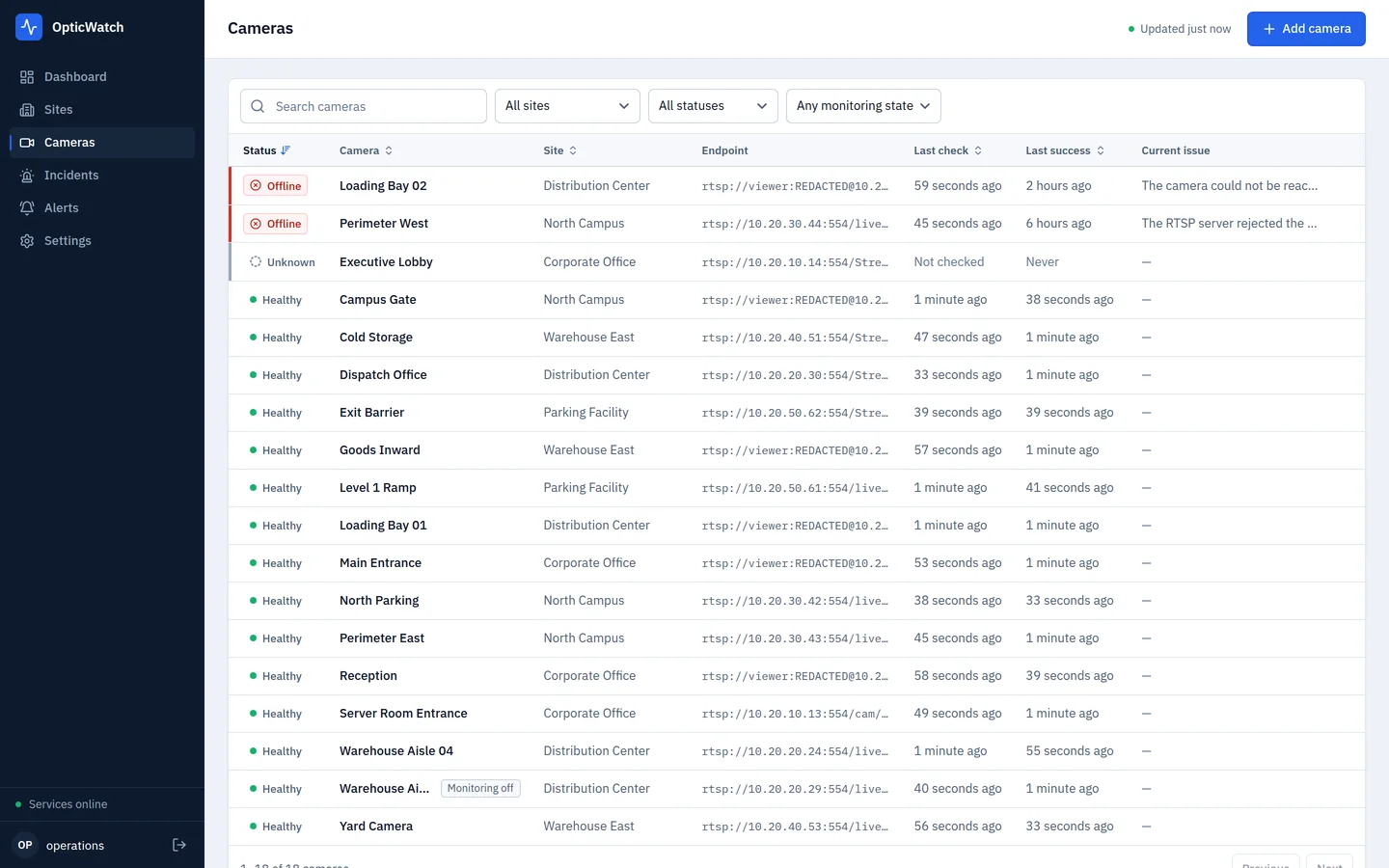
The camera inventory, sorted so anything failing is already at the top. Stored credentials are redacted everywhere they would otherwise appear.
Camera detail
Every check, kept.
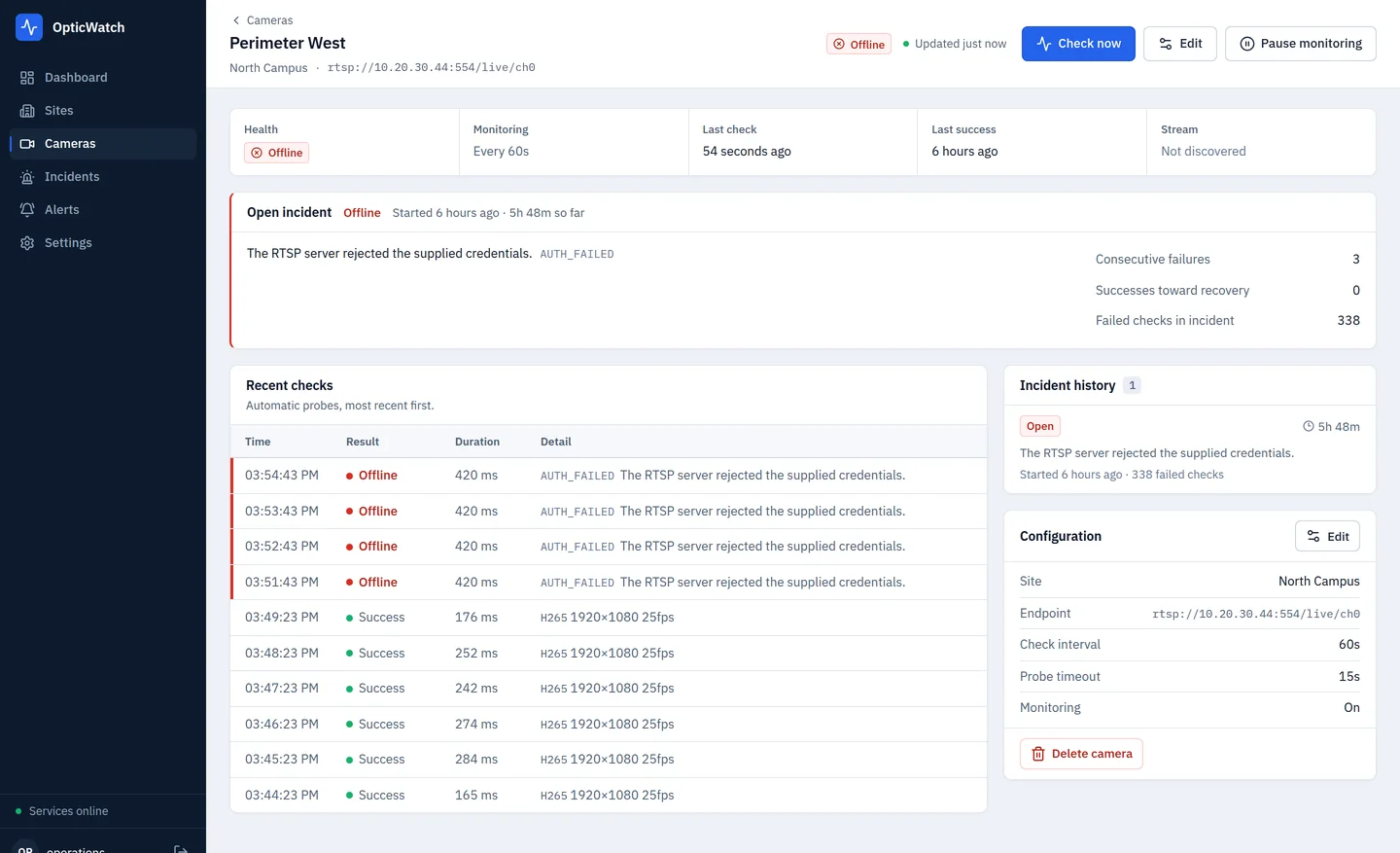
Open a camera and you get its current health, how long the current incident has been running, the counters that decide its state, and the recent probe history — including the exact moment successful checks turned into failures.
- Open incident with duration and failure reason
- Recent automatic checks with probe duration and stream details
- Incident history for that camera
- Configuration, with the endpoint redacted
Incidents and alerts
A record, not just a red dot.
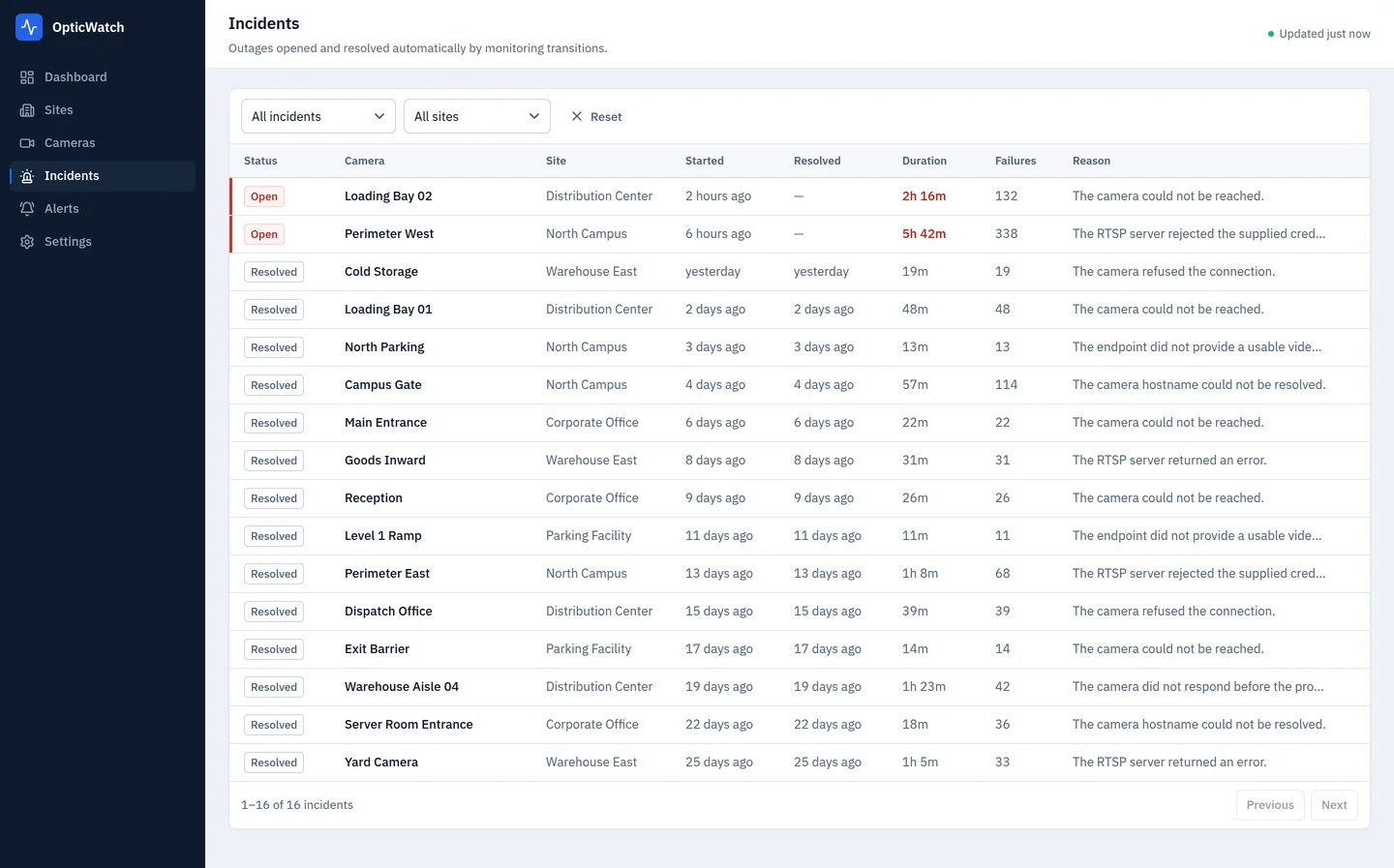
Incidents open and resolve on their own as monitoring transitions happen, so downtime is measured rather than remembered. Alerts go out to email and to signed webhooks, and every attempt is logged — including the ones that failed and are being retried.
- One open incident per camera, with its duration and failure count
- Resolved history you can hand to a customer
- Email alerts, configured in the application
- HMAC-signed webhooks for your own tooling
- Delivery history with bounded automatic retries
Alert delivery
You can see whether the alert actually arrived.
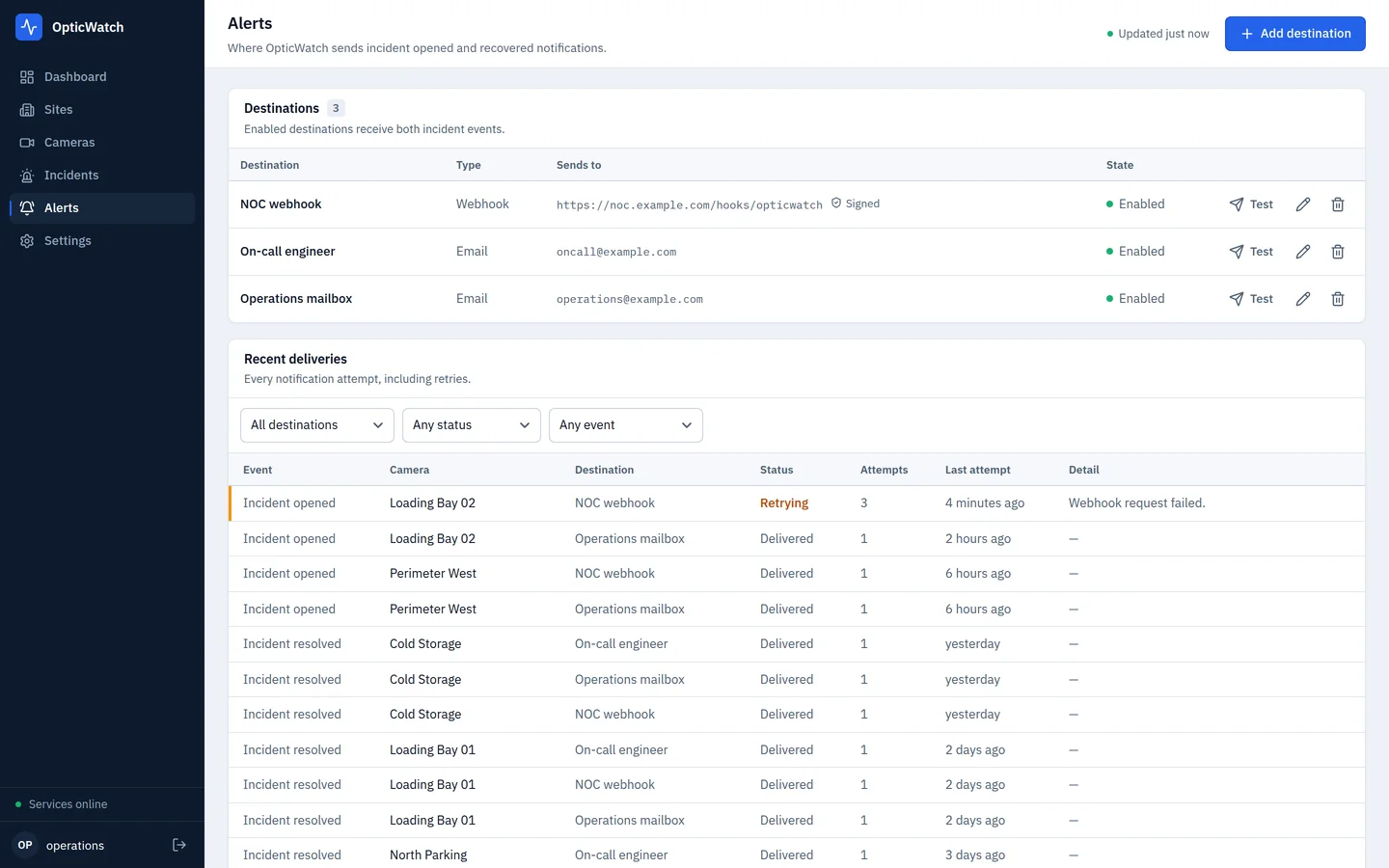
Destinations and their delivery history. Webhook signing secrets are write-only — the interface shows that a secret is configured, never the secret.
Onboarding
ONVIF gets cameras in faster. RTSP keeps them honest.
Typing RTSP paths for an estate you inherited is slow and error prone. Where a camera supports ONVIF, OpticWatch can do that part for you — then hands the resulting stream to the same monitoring engine every other camera uses.
Find the device
Scan the local network, or enter the camera’s ONVIF address directly when discovery cannot reach it.
Read what it is
Manufacturer, model, firmware and serial number, pulled from the device itself.
Pick a profile
Compare the media profiles the camera offers, with codec, resolution and frame rate where reported.
Start monitoring
OpticWatch retrieves the stream address for that profile and monitors it exactly like a manually added camera.
ONVIF never decides a camera’s health. It cannot open an incident, move a threshold counter or send an alert — that stays with the RTSP checks. OpticWatch performs no PTZ control, no configuration changes and no firmware operations on your cameras.
Your infrastructure
It runs where your cameras already are.
Camera estates sit on private networks for good reasons. OpticWatch is built to live on that side of the boundary rather than asking you to expose cameras to a third party.
Your server
A Docker Compose stack with its own PostgreSQL database, on hardware you control. 1 vCPU and 1 GB of RAM is enough for a few cameras; larger installations need more.
Your credentials
RTSP, ONVIF and webhook secrets are encrypted in your database with a key that stays on your server. It is never stored in the database it protects.
Your data
Camera inventory, health history and incidents stay in your database. Monitoring needs no connection to any OpticWatch service.
Said precisely: monitoring itself involves no external service. Alerts are the deliberate exception — if you configure email or a webhook, OpticWatch contacts the mail server or endpoint you specify, because that is what being notified requires.
Security
What protects the credentials you hand over.
OpticWatch holds working credentials for your camera estate, so here is specifically how they are treated. These are implementation facts, not certifications — OpticWatch holds no formal security accreditation.
- Stored secrets
- RTSP URLs, ONVIF passwords, webhook signing secrets and the SMTP password are encrypted with AES-256-GCM, each bound to its own record so ciphertext cannot be moved between them.
- Encryption key
- Kept on your server, outside the database it protects, and never written to it. Starting with a key that cannot read the stored credentials fails loudly instead of running with unreadable data.
- Administrator access
- A single local administrator account with no default password. Passwords are hashed with Argon2id.
- Sessions
- Opaque tokens stored only as a SHA-256 digest, in an HttpOnly, SameSite=Strict cookie that is marked Secure when served over HTTPS.
- Request protection
- State-changing requests must carry a matching Origin header, giving CSRF protection alongside the cookie policy. Login attempts are rate limited.
- What never leaves
- Passwords, session tokens, the encryption key, credential-bearing stream URLs and raw probe output are never returned by the API and never written to logs.
- Outbound requests
- Webhook and ONVIF calls have fixed timeouts, capped response sizes and refuse redirects. Webhooks are signed with HMAC-SHA256 so receivers can verify them.
- Network posture
- In the default deployment the database and API bind to loopback; only the web interface is exposed, and it belongs behind your own HTTPS reverse proxy.
Who it is for
The people who get the phone call.
CCTV installers
Find the dead camera before the customer reviewing last night’s footage does.
Security integrators
Run a separate OpticWatch for each customer you maintain — up to five on one Integrator license.
Infrastructure teams
Treat cameras like any other monitored service, with incidents and history.
Multi-site operators
See which sites are healthy without logging into each recorder in turn.
Questions
Straight answers.
What does OpticWatch actually check?
It opens the camera's RTSP stream on a schedule and reads the video stream's technical details — codec, resolution and frame rate. A camera that answers on the network but cannot serve a usable video stream is reported as failing, with the reason. It does not view, decode for display, record or analyze the footage.
Does OpticWatch record video?
No. It is not an NVR, a VMS or a video viewer, and it has no recording, playback or analytics. It monitors whether your camera infrastructure is healthy and tells you when it is not.
Is it really self-hosted?
Yes. OpticWatch runs as a Docker Compose stack on your own server, with its own PostgreSQL database. There is no OpticWatch cloud service involved in monitoring your cameras, and the application does not need internet access to monitor them.
Where do camera credentials live?
In your database, encrypted with AES-256-GCM using a key that stays on your server and is never stored in the database itself. Credentials are never returned by the API, never written to logs, and the endpoint shown in the interface is redacted. Losing the key means the stored credentials cannot be recovered, so the key is backed up along with the database.
Do my cameras need to support ONVIF?
No. ONVIF only assists onboarding. You can add any camera by entering its RTSP URL directly, and monitoring works identically either way.
What if ONVIF discovery finds nothing?
Discovery uses UDP multicast, which stays on the local broadcast domain and does not cross routers, VLANs or VPNs — so an empty result means nothing answered on that network segment, not that no cameras exist. Entering the ONVIF address manually always works, and is the supported path in that situation.
Which alerts are supported?
Email and generic signed webhooks. Every attempt, retry and failure is recorded in delivery history. There are no native Slack, Teams or PagerDuty integrations; the webhook is what you would connect to such a system yourself.
Which cameras are supported?
OpticWatch works with cameras that expose a standard RTSP stream, and can use ONVIF for onboarding where a camera supports it. Broad interoperability testing against physical cameras from specific manufacturers has not been completed, so no vendor compatibility is claimed.
How does licensing work?
Free needs no license: install it as many times as you need, each installation with one site and up to five cameras. Pro and Integrator are one-time licenses, activated once on your server and then verified offline, with no subscription and no expiry. Monitoring, incidents and incident history are in every edition, including the free one. What the paid editions add is outbound alert delivery and higher camera and site limits; Integrator covers up to five separate installations. Commercial use is permitted on every edition — the paid editions buy capability, not permission to use it at work.
Can I monitor cameras I do not own?
No. You must own, manage, or be expressly authorized to access every endpoint you add. OpticWatch is a maintenance tool for infrastructure you are responsible for.
Put it in front of your own cameras.
Install the free edition on your own server: one site and five cameras, with no license and no account. Move to Pro or Integrator when you need alerts or more cameras.